
1️⃣ 如何获取Descriptor (用于注册Ethoca)
大多数支付机构都支持在商户后台直接查看或设置 Descriptor(账单名称)。如果后台未显示,商家也可以直接联系支付机构客服,询问自己账号所使用的正式 Descriptor。
🌟以下是部分支付机构的查看路径:
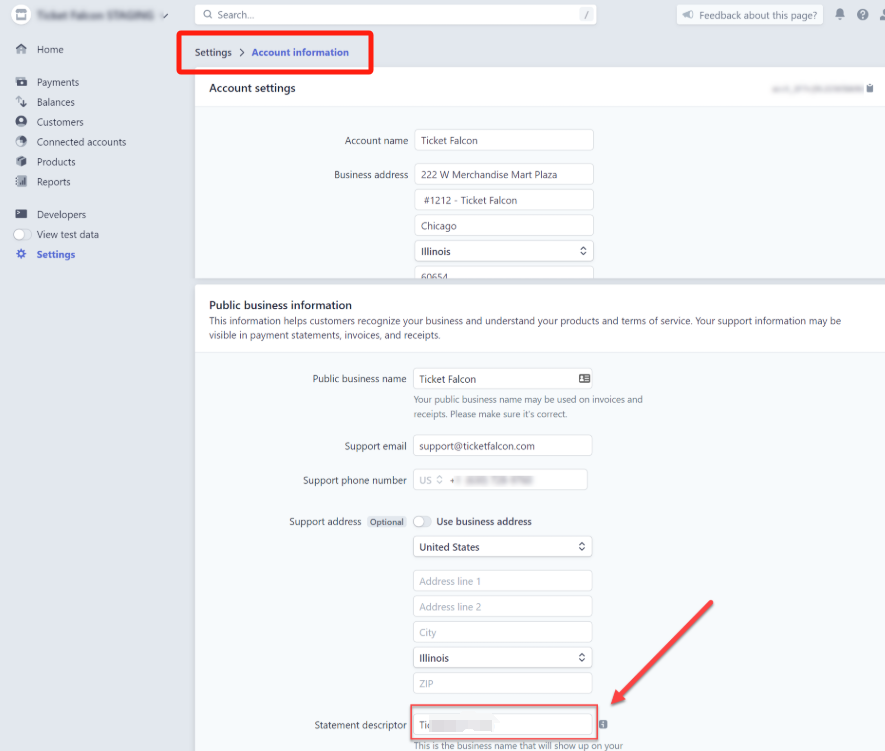
- Stripe: Settings → Branding / Statement descriptor
- Antom: Merchant Profile / Payment Settings
- Airwallex:Account → Settings → Payment acceptance
- Worldpay:Payment Configuration → Statement descriptor
- Adyen:Merchant Settings → Payment methods
后台页面(以Stripe为例):
2️⃣如何获取BIN+CAID (用于注册RDR服务)
Acquirer BIN(收单行 BIN) 和 CAID(Card Acceptor ID)。这两个字段属于 支付机构的收单配置信息,一般不会在商户后台直接展示。请联系您的支付服务商客服或客户经理,说明需要用于注册Visa RDR 服务(Rapid Dispute Resolution),即可由对方提供 BIN 和 CAID
3️⃣ 如何获取ARN (用于注册RDR服务)
- 什么是 ARN? ARN(Acquirer Reference Number)收单参考号,是发卡行 ⇄ 卡组织 ⇄ 收单机构 之间追踪同一笔信用卡交易的唯一编号。当出现退款、拒付、调查查询时,ARN 是银行和支付机构定位交易的“身份证号”。
- 商家如何获取 ARN?
- 方式 1:从支付机构后台直接查看大部分支付机构都会在交易或退款详情页展示 ARN。 一般路径为: 交易列表 → 点开单笔交易 → Refund(退款)或 Chargeback(拒付)详情 → ARN / Acquirer Reference Number(不同通道字段命名可能略有不同,如:ARN / acquirer_reference_number / network_reference_id)
- 方式 2:在退款生成后自动显示,对于退款(Refund),ARN 通常会在退款成功后 1–2 天出现;对于拒付(Chargeback),ARN 会在发卡行提交后由收单机构同步,通常在拒付创建当日即可看到
- 方式 3:直接联系支付通道客服索取.如果后台没有展示,商家可以通过以下方式获得:“请帮我提供订单号 XXXX 的 ARN(Acquirer Reference Number),用于追踪退款 / 拒付。”支付机构客服一般会在数小时至 1 个工作日内提供